
Taming the paper tiger
A colleague was asking for some simple advice about all-in-one printer/copier/fax devices and got instead a rambling lecture on my paper workflow. There is no reason the Internet should be exempted from my long-winded rants, so here goes, an excruciatingly detailed description of my paper workflow. It shares the same general outline as my digital photography workflow, with a few twists.
Formats
The paperless office is what I am striving for. Digital files are easier to protect than paper from fire or theft, and you can carry them with you everywhere on a Flash memory stick. As for file formats, you don’t want to be locked in, so you should either use TIFF or PDF, both of which have open-source readers and are unlikely to disappear anytime soon, unlike Microsoft’s proprietary lock-in format of the day.
TIFF is easier to retouch in an image editing program, but:
- Few programs cope correctly with multi-page TIFFs
- PDF allows you to combine a bitmap layer to have an exact fac-simile with a searchable OCR text layer for retrieval, TIFF does not.
- TIFF is inefficient for vector documents, e.g. receipts printed from a web page.
- The TIFF format lacks many of the amenities designed in a format like PDF expressly designed as a digital replacement for paper.
Generating PDFs from web pages or office documents is as simple as printing (Mac OS X offers this feature out of the box, for Windows, you can print to PostScript and use Ghostscript to convert the PS to PDF.
Please note the bloated Acrobat Reader is not a must-have to view PDFs, Mac OS X’s Preview does a much better job, and on Windows Foxit Reader is a perfectly serviceable alternative that easily fits on a Flash USB stick. UNIX users have Ghostscript and the numerous UI wrappers that make paging and zooming easy..
Acquisition
You should process incoming mail as soon as you receive it, and not let it build up. If you have a backlog, set it aside and start your new system, applicable to all new snail mail. That way the situation does not degrade further, and you can revisit old mail later.
Junk mail that could lead to identity theft (e.g. credit card solicitations) should be shredded or even better, burnt (assuming your local environmental regulations permit this). if you get a powerful enough shredder, it can swallow the entire envelope without even forcing you to open it. Of course, you should only consider a cross-cut shredder. Junk mail that does not contain identifiable information should be recycled. When in doubt, shred. Everything else should be scanned.
Forget about flatbed scanners, what you want is a sheet-fed batch document scanner. It should support duplex mode, i.e. be capable of scanning both sides of a sheet of paper in a single pass. For Mac users Fujitsu ScanSnap is pretty much the only game in town, and for Windows users I recommend the Canon DR-2050C (the ScanSnap is available in a Windows version, but the Canon has a more reliable paper feed less prone to double-feeding). Either will quickly scan a sheaf of paperwork to a PDF file at 15–20 pages per minute.
Filing
Paper is a paradox: it is the most intuitive medium to deal with in the short-term, but also the most unwieldy and unmanageable over time. As soon as you layer two sheets into a pile, you have lost the fluidity that is paper’s essential strength. Shuffling through a pile takes an ever increasing amount of time as the pile grows.
For this reason, you want to organize your filing plan in the digital domain as much as possible. Many experts set up elaborate filing plans with color-coded manila folders and will wax lyrical about the benefits of ball-bearing sliding file cabinets. In the real world, few people have the room to store a full-fledged file cabinet.
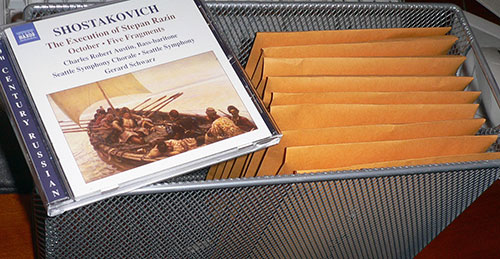
The simplest form of filing is a chronological file. You don’t even need file folders — I just toss my mail in a letter tray after I scan it. At the end of each month, I dump the accumulated mail into a 6″x9″ clasp envelope (depending on how much mail you receive, you may need bigger envelopes), and label it with the year and month. In all likelihood, you will never access these documents again, so there is no point in arranging them more finely than that. This filing arrangement takes next to no effort and is very compact – you can keep a year’s worth in the same space as a half dozen suspended file folders, as can be seen with 9 months’ worth of mail in the photo below (the CD jewel case is for scale).
 There are some sensitive documents you should still file the
old-fashioned way for legal reasons, such as birth certificates, diplomas,
property titles, tax returns and so on. You should still scan them to have a
backup in case of fire.
There are some sensitive documents you should still file the
old-fashioned way for legal reasons, such as birth certificates, diplomas,
property titles, tax returns and so on. You should still scan them to have a
backup in case of fire.
Date stamping
As you may have to retrieve the paper original for a scanned document, is important to date stamp every page (or at least the first page) of any mail you receive. I use a Dymo Datemark, a Rube Goldberg-esque contraption that has a rubber ribbon with embossed characters running around an ink roller and a small moving hammer that strikes when the right numeral passes by. All you really need is a month resolution so you know which envelope to fetch, thus an ordinary month-year rubber stamp would do as well. Ideally you would have software to insert a digital date stamp directly in the document, but I have not found any yet. A tip: stamp your document diagonally so the time stamp stands out from the horizontal text.
Management
Much as it pains me to admit it, Adobe Acrobat (supplied with the Fujitsu ScanSnap) is the most straightforward way to manage PDF files on Windows, e.g. merge multiple files together, insert new pages, annotate documents and so on. Through web capture OCR, it can create an invisible text layer that makes the PDF searchable with Spotlight. There are alternatives, such as Foxit PDF Page Organizer or PaperPort on Windows, and PDFPen on OS X. Since Leopard, Apple’s Preview app has included most of the PDF editing functionality required, so I take great pains to ensure my Macs are untainted by Acrobat (e.g. unselecting it when installing CS3). See also my article on resetting the creator code for PDF files on OS X so they are opened by Preview for viewing.
Encryption
If you are storing a backup of your personal papers at work or on a public service like Google’s rumored Gdrive, you don’t want third-parties to access your confidential information. Similarly, you don’t want to be exposed to identity theft if you lose a USB Flash stick with the data on it. The solution is simple: encryption.
There are many encryption packages available. Most probably have back doors for the NSA, but your threat model is the ID fraudster rummaging through your trash for backup DVDs or discarded bank statements, not the government. I use OpenSSL’s built-in encryption utility as it is cross-platform and easily scripted (I compiled a Windows executable for myself, and it is small enough to be stored on a Flash card). Mac and UNIX computers have it preinstalled, of course, do man enc for more details.
To encrypt a file using 256-bit AES, you would use the command:
openssl enc -aes-256-cbc -in somefile.pdf -out somefile.pdf.aes
to decrypt it, you would issue the command:
openssl enc -d -aes-256-cbc -in somefile.pdf.aes -out somefile.pdf
OpenSSL will prompt you for the password, but you can also supply it as a command-line argument, e.g. in a script.
Backup
Backing up scanned documents is no different than backing up photos (apart from the encryption requirements), so I will just link to my previous essay on the subject or my current backup scheme. In addition to my external Firewire hard drive rotation scheme, I have a script that does an incremental encryption of modified files using OpenSSL, and then uploads the encrypted files to my office computer using rsync.
Retention period
I tend to agree with Tim Bray in that you shouldn’t bother erasing old files, as the minimal disk space savings are not worth the risk of making a mistake. As for paper documents, you should ask your accountant what retention policy you should adopt, but a default of 2 years should be sufficient (the documents that need more, such as tax returns, are in the “file traditionally” category, in any case).
Fax
The original question was about fax. OS X can be configured to receive faxes on a modem and email them to you as PDF attachments, at which point you can edit them in Acrobat, and fax it back if required, without ever having to kill a tree with printouts. Windows has similar functionality. Of course, fax belongs in the dust-heap of history, along with clay tablets, but habits change surprisingly slowly.
Update (2006-08-26):
I recently upgraded my shredder to a Staples SPL-770M micro-cut shredder. The particles generated by the shredder are incredibly minute, much smaller than those of conventional home or office grade shredders, and it is also very quiet to boot.
Unfortunately, it isn’t able to shred an entire unopened junk mail envelope, and the micro-cut shredding action does not work very well if you feed it folded paper (the particles at the fold tend to cling as if knitted together). This unit is also more expensive than conventional shredders (but significantly cheaper than near mil-spec DIN level 5 shredders that are the nearest equivalent). Staples regularly has specials on them, however. Highly recommended.
Update (2007-04-12):
I recently upgraded my document scanner to a Fujitsu fi-5120C. The ScanSnap has a relatively poor paper feed mechanism, which often jams or double-feeds. Many reviews of the new S500M complain it also sufffers from double-feeding. The 5120C is significantly more expensive but it has a much more reliable paper feed with hitherto high-end features like ultrasonic double-feed detection. You do need to buy ScanTango software to run it on the Mac, however.
Update (2009-01-21):
I moved recently, and realized I have never yet had to open one of those envelopes. From now on, all papers not required for legal reasons (e.g. tax documents) go straight to the shredder after scanning.
Update (2009-09-08):
The new ScanSnap 1500 has ultrasonic double-feed detection. I bought a copy of ABBYY FineReader Express for the Mac. It used to be only available as bundled software with certain scanners like recent ScanSnaps, or software packages like DEVONthink, but you can now buy it as a standalone utility. It is not full-featured, missing some of the more esoteric OCR functionality of the Windows version, batch capabilities and scripting, but works well, unlike the crash-prone ReadIRIS I had but seldom used.
Update (2009-09-22):
Xamance is a really interesting French startup. Their product, the Xambox, integrates a document scanner, document management software and a physical paper filing system. The system can tell you exactly where to find the paper original for a scanned document (“use box 2, third document after tab 7”). In other words, essentially the same filing system I suggest above, but systematically managed in a database for easy retrieval.
It is quite expensive, however, making it more of a solution for businesses. I have moved on and no longer need the safety blanket of keeping the originals, but I can easily see how a complete solution like this would be valuable for businesses that are required for compliance to keep originals, such as notaries, or even government public records offices.
Credit card receipt slips and business cards are problematic for a paperless workflow. They are prone to jam in scanners, have non-standard layouts so hunting for information takes more time than it should, and are usually so trivial you don’t really feel they are worth scanning in the first place. I just subscribed to the Shoeboxed service to manage mine.They take care of the scanning and for pouring the resulting data in a form that can be directly imported into personal finance or contact-management software. I don’t yet have sufficient experience with the service, but on paper at least it seems like a valuable service that will easily save me an hour a week.
Update (2011-01-13):
I finally broke down and upgraded to a ScanSnap S1500M (we have one at work, and it is indeed a major improvement over the older models). In theory this is a downgrade as the fi-5120C is a business scanner, whereas the S1500M is a consumer/SoHo model, but with some simple customization, the integrated software bundle makes for a much more streamlined workflow: put the paper in the hopper, press the button, that’s it. With the fi-5120C, I had to select the scan settings in ScanTango, scan, press the close button, select a filename, drag the file into ABBYY FineReader, select OCR options, click save, click to confirm I do want to overwrite the original file, then dismiss the scan detection window. One step vs. nine.
Update (2012-06-19):
For portable storage of the documents, I don’t bother with manually encrypting the files any more. The IronKey S200 is a far superior option: mil-spec security and hardware encryption, with tamper-resistant circuitry, potted for environment resistance and using SLC flash memory for speed. Sure, it’s expensive, but you get what you pay for (I tried to cut costs by getting the MLC D200, and ended up returning it because it is so slow as to be unusable).
