IT

Funding the vetting of the Software Supply-Chain

TL:DR A way out of our software supply-chain security mess

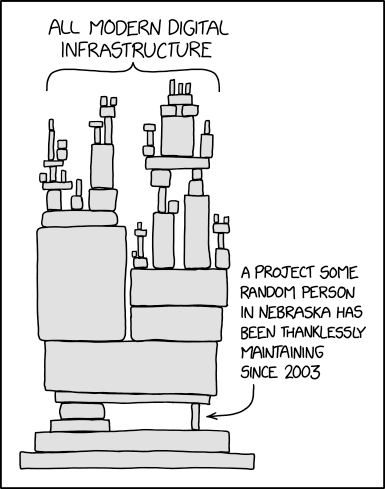
As memorably illustrated by XKCD, the way most software is built today is by bolting together reusable software packages (dependencies) with a thin layer of app-specific integration code that glues it all together. Others have described more eloquently than I can the mess we are in, and the technical issues.

XKCD

Crises like the log4j fiasco or the Solarwinds debacle are forcing the community to wake up to something security experts have been warning about for decades: this culture of promiscuous and undiscriminating code reuse is unsustainable. On the other hand, for most software developers without the resources of a Google or Apple behind them, being able to leverage third-parties for 80% of their code is too big an advantage to abandon.

This is fundamentally an economic problem:

  • To secure a software project to commercial standards (i.e. not the standards required for software that operates a nuclear power plant or the NSA’s classified systems, or that requires validation by formal methods like TLA+), some form of vetting and code reviews of each software dependency (and its own dependencies, and the transitive closure thereof) needs to happen.
  • Those code reviews are necessary, difficult, boring, labor-intensive, require expertise and somebody needs to pay for that hard work.
  • We cannot rely entirely on charitable contributions like Google’s Project Zero or volunteer efforts.
  • Each version of a dependency needs to be reviewed. Just because version 11 of foo is secure doesn’t mean a bug or backdoor wasn’t introduced in version 12. On the other hand, reviewing changes takes less effort than the initial review.
  • It makes no sense for every project that consumes a dependency to conduct its own duplicative independent code review.
  • Securing software is a public good, but there is a free-rider problem.
  • Because security is involved, there will be bad actors trying to actively subvert the system, and any solution needs to be robust to this.
  • This is too important to allow a private company to monopolize.
  • It is not just the Software Bill of Materials that needs to be vetted, but also the process. Solarwinds was probably breached because state-sponsored hackers compromised their Continuous Integration infrastructure, and there is Ken Thompson’s classic paper on the risks of Trusting Trust (original ACM article as a PDF).
  • Trust depends on the consumer and the context. I may trust Google on security, but I certainly don’t on privacy.

I believe the solution will come out of insurance, because that is the way modern societies handle diffuse risks. Cybersecurity insurance suffers from the same adverse-selection risk that health insurance does, which is why premiums are rising and coverage shrinking.

If insurers require companies to provide evidence that their software is reasonably secure, that creates a market-based mechanism to fund the vetting. This is how product safety is handled in the real world, with independent organizations like Underwriters Laboratories or the German TÜVs emerging to provide testing services.

Governments can ditch their current hand-wavy and unfocused efforts and push for the emergence these solutions, notably by long-overdue legislation on software liability, and at a minimum use their purchasing power to make them table stakes for government contracts (without penalizing open-source solutions, of course).

What we need is, at a minimum:

  • Standards that will allow organizations like UL or individuals like Tavis Ormandy to make attestations about specific versions of dependencies.
  • These attestations need to have licensing terms associated with them, so the hard work is compensated. Possibly something like copyright or Creative Commons so open-source projects can use them for free but commercial enterprises have to pay.
  • Providers of trust metrics to assess review providers. Ideally this would be integrated with SBOM standards like CycloneDX, SPDX or SWID.
  • A marketplace that allows consumers of dependencies to request audits of a version that isn’t already covered.
  • A collusion-resistant way to ensure there are multiple independent reviews for critical components.
  • Automated tools to perform code reviews at lower cost, possibly using Machine Learning heuristics, even if the general problem can be proven the be computationally untractable.

The fetish for uptime

At one of my previous jobs, the engineers on my team had an informal competition as to who could rack up the longest uptime on their workstation (they all had Sun Solaris or Linux, of course). When the company moved to a new office, one crafty engineer managed to beat all the others by putting his Sun into the seldom-used hibernation mode to preserve his uptime when everyone else was forced to reboot.

I posit that uptime is actually a bad thing. All software has bugs, and a regular maintenance schedule to apply patches, at the very least once a month, should be part of the plan and designed into the architecture. By that token, an uptime greater than 31 days is a “code smell” for infrastructure.

PSA: iCloud Private Relay can make Safari on your iPad unusable

After upgrading my iPad to iPadOS 15.5, Safari became unusable. It would take forever to load the Reddit login page, and many others like Dilbert.com. Opening the same in Firefox Focus had no issues.

Going into Settings / Safari / Privacy & Security / Hide IP Address and disabling it fixed this for me. Alternatively you can disable it only for specific networks (Settings / Wi-Fi / ⓘ / Limit IP Address Tracing / Off).

It seems Apple turned on iCloud Private Relay on by default for Safari in iPadOS 15.5 and presumably iOS 15.5 as well. Macs are probably next.

I can only speculate why turning it off fixes the breakage, but:

  • The feature routes your calls through Akamai then CloudFlare, and for whatever reason CloudFlare doesn’t seem to like my ISP, I often encounter their “prove you are human” challenges.
  • It may also be because Apple overrides your DNS settings for this feature to work, and if your network is locked down with something like Pi-Hole to prevent trackers, those DNS requests may not be getting through. I don’t want IoT devices or the like to bypass my DNS server, which uses Wireguard to my Cloud VPN server to ensure my ISP cannot snoop on my DNS requests (a setup I believe more secure and private than Apple’s), nor CloudFlare, nor the UK Police State. I haven’t blocked DNS-over-HTTPS servers yet as this guy does but it’s on my list. This might be interfering with iCloud Private Relay.
  • It may also be sabotage, as Rui Carmo points out, or as John Oliver memorably calls it, “Cable Company F∗∗∗ery”.

How to ensure a cron job runs exclusively

TL:DR a simple but effective mutex for cron jobs

Often you need to run a job periodically, e.g. backing up files, but the job could take more time than the interval allotted between runs, and you do not want multiple instances of the process to be running at the same time. For instance, bad things happen when multiple rsync processes are trying to synchronize the same folders to the same destination. Thus you want a mutex, something that ensures only one copy of the process can run at any given time.

There are approaches using lock files, but if the computer reboots or the job crashes, the lockfile will not be deleted and all subsequent runs of the job will fail. Some advocate using flock() or fcntl(), but those calls are finicky with strange semantics, e.g. fcntl will release a lock if any related process closes the file.

My solution to deal with this is to bind an IPv6 localhost ::1 socket to a given port. Only one process can do this, and thus it’s a very effective mutex. No lock files to cause havoc, no dealing with the dark and buggy corners of advisory file locking.

For shell scripts, simply replace the #!/bin/sh with #!/somewhere/bin/lock 2048 where 2048 is the port number you will use to enforce the lock (greater than 1024 if you do not want to deal with the hassles of privileged ports). If you want the jobs to wait and not exit immediately if they fail to acquire the lock, just change the line to #!/somewhere/bin/lock w2048

The code is in lock.c. Just compile using:

gcc -O2 -o lock lock.c

or

clang -O2 -o lock lock.c.

#include <unistd.h>
#include <sys/types.h>
#include <sys/socket.h>
#include <stdlib.h>
#include <stdio.h>
#include <errno.h>
#include <netinet/in.h>
#include <inttypes.h>
#include <sys/time.h>
#include <string.h>

extern char **environ;

int main(int argc, char **argv) {
  int sock, port, status, exit_on_fail;
  char *port_start, *port_end = NULL;
  struct sockaddr_in6 sin6;
  struct timeval timeout;

  if (argc < 3) {
    fprintf(
      stderr,
      "Usage:\n"
      "\t#!%s [w]<port:1-65535> (first line of script instead of #!/bin/sh)\n"
      "\t\tor\n"
      "\t%s [w]<port:1-65535> -c \"cmd [args...]\"\n\n"
      "\tw: wait if we could not get the port\n",
      argv[0], argv[0]);
    return -1;
  }
  
  exit_on_fail = 1;
  port_start = argv[1];
  if (port_start[0] == 'w') {
    exit_on_fail = 0;
    port_start++;
  }
  port = strtol(port_start, &port_end, 10);
  if (port_end != port_start + strlen(port_start)) {
    printf("port %s invalid format, must be integer between 1 and 65535\n",
           port_start);
    return -2;
  }
  if (port < 1 || port > 65535) {
    printf("port %d invalid, must be between 1 and 65535\n", port);
    return -3;
  }

  sock = socket(PF_INET6, SOCK_DGRAM, IPPROTO_UDP);
  if (sock == -1) {
    perror("could not create socket");
    return -4;
  }

  sin6.sin6_family = AF_INET6;
  sin6.sin6_port = htons(port);
  sin6.sin6_addr = in6addr_loopback;

  status = -1;
  while (status < 0) {
    status = bind(sock, (const struct sockaddr *) &sin6, sizeof(sin6));
    if (status < 0) {
      if (exit_on_fail) {
        /* perror("could not bind socket"); */
        return -5;
      }
      timeout.tv_sec = 1;
      timeout.tv_usec = 0;
      /* fputs("sleeping...\n", stderr); */
      select(0, NULL, NULL, NULL, &timeout);
      
    }
  }
  /* default to /bin/sh if no args are supplied, so we can do something like:
     #!lock 2048
     instead of
     #!/bin/sh
  */
  argv[1] = "/bin/sh";
  execvp("/bin/sh", &argv[1]);
}

Automating Epson SSL/TLS certificate renewal

Network-capable Epson printers like my new ET-16600 have a web-based user interface that supports HTTPS. You can even upload publicly recognized certificates from Let’s Encrypt et al, unfortunately the only options they offer is a Windows management app (blech) or a manual form.

When you have to upload this every month (that’s when I automatically renew my Let’s Encrypt certificates), this gets old really fast, and strange errors happen if you forget to do so and end up with an expired certificate.

I wrote a quick Python script to automate this (and yes, I am aware of the XKCDs on the subject of runaway automation):

#!/usr/bin/env python3
import requests, html5lib, io

URL = 'https://myepson.example.com/'
USERNAME = 'majid'
PASSWORD = 'your-admin-UI-password-here'
KEYFILE = '/home/majid/web/acme-tiny/epson.key'
CERTFILE = '/home/majid/web/acme-tiny/epson.crt'

########################################################################
# step 1, authenticate
jar = requests.cookies.RequestsCookieJar()
set_url = URL + 'PRESENTATION/ADVANCED/PASSWORD/SET'
r = requests.post(set_url, cookies=jar,
                  data={
                    'INPUTT_USERNAME': USERNAME,
                    'access': 'https',
                    'INPUTT_PASSWORD': PASSWORD,
                    'INPUTT_ACCSESSMETHOD': 0,
                    'INPUTT_DUMMY': ''
                  })
assert r.status_code == 200
jar = r.cookies

########################################################################
# step 2, get the cert update form iframe and its token
form_url = URL + 'PRESENTATION/ADVANCED/NWS_CERT_SSLTLS/CA_IMPORT'
r = requests.get(form_url, cookies=jar)
tree = html5lib.parse(r.text, namespaceHTMLElements=False)
data = dict([(f.attrib['name'], f.attrib['value']) for f in
             tree.findall('.//input')])
assert 'INPUTT_SETUPTOKEN' in data

# step 3, upload key and certs
data['format'] = 'pem_der'
del data['cert0']
del data['cert1']
del data['cert2']
del data['key']

upload_url = URL + 'PRESENTATIONEX/CERT/IMPORT_CHAIN'

########################################################################
# Epson doesn't seem to like bundled certificates,
# so split it into its componens
f = open(CERTFILE, 'r')
full = f.readlines()
f.close()
certno = 0
certs = dict()
for line in full:
  if not line.strip(): continue
  certs[certno] = certs.get(certno, '') + line
  if 'END CERTIFICATE' in line:
    certno = certno + 1
files = {
  'key': open(KEYFILE, 'rb'),
}
for certno in certs:
  assert certno < 3
  files[f'cert{certno}'] = io.BytesIO(certs[certno].encode('utf-8'))

########################################################################
# step 3, submit the new cert
r = requests.post(upload_url, cookies=jar,
                  files=files,
                  data=data)

########################################################################
# step 4, verify the printer accepted the cert and is shutting down
if not 'Shutting down' in r.text:
  print(r.text)
assert 'Shutting down' in r.text
print('Epson certificate successfully uploaded to printer.')

Update (2020-12-29):

If you are having problems with the Scan to Email feature, with the singularly unhelpful message “Check your network or WiFi connection”, it may be the Epson does not recognize the new Let’s Encrypt R3 CA certificate. You can address this by importing it in the Web UI, under the “Network Security” tab, then “CA Certificate” menu item on the left. The errors I was seeing in my postfix logs were:

Dec 29 13:30:20 zulfiqar mail.info postfix/smtpd[13361]: connect from epson.majid.org[10.0.4.33]
Dec 29 13:30:20 zulfiqar mail.info postfix/smtpd[13361]: SSL_accept error from epson.majid.org[10.0.4.33]: -1
Dec 29 13:30:20 zulfiqar mail.warn postfix/smtpd[13361]: warning: TLS library problem: error:14094418:SSL routines:ssl3_read_bytes:tlsv1 alert unknown ca:ssl/record/rec_layer_s3.c:1543:SSL alert number 48:
Dec 29 13:30:20 zulfiqar mail.info postfix/smtpd[13361]: lost connection after STARTTLS from epson.majid.org[10.0.4.33]
Dec 29 13:30:20 zulfiqar mail.info postfix/smtpd[13361]: disconnect from epson.majid.org[10.0.4.33] ehlo=1 starttls=0/1 commands=1/2

Update (2021-08-01):

The script was broken due to changes in Let’s Encrypt’s trust path. Seemingly Epson’s software doesn’t like certificates incorporating 3 PEM files and shows the singularly unhelpful error “Invalid File”. I modified the script to split the certificate into its component parts. You may also need to upload the root certificates via the “CA Certificate” link above. I added these and also updated the built-in root certificates to version 02.03 and it seems to work:

  • lets-encrypt-r3-cross-signed.pem 40:01:75:04:83:14:a4:c8:21:8c:84:a9:0c:16:cd:df
  • isrgrootx1.pem 82:10:cf:b0:d2:40:e3:59:44:63:e0:bb:63:82:8b:00
  • lets-encrypt-r3.pem 91:2b:08:4a:cf:0c:18:a7:53:f6:d6:2e:25:a7:5f:5a

They are available from the Let’s Encrypt certificates page.

Update (2026-04-20):

Two readers independently cleaned it up: